Fred Scott, Jr.
(434) 295-4188


A PAPERLESS COCKPIT
++++
Jepp Charts on the Avidyne EX600 and
the SolidFX chart tablet

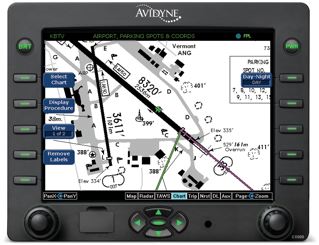
Ours was among the first cockpits to adopt the superb Avidyne EX500 MultiFunction Display, and our configuration (which has now been upgraded several times) has always included Cmax -- Avidyne's variant of Jeppesen-format airport charts (Arrivals, Approaches, and Departures).
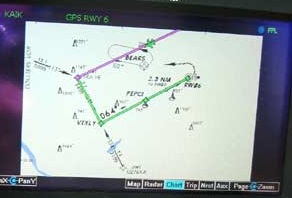
The EX500 could do it all pretty well, but with mapping, airborne radar, traffic, and charts on the MFD, I always felt that I had a bit too much information on one screen. There was too much toggling back and forth, and that busy-work always seemed to occur when I needed to be concentrating on more important tasks.

When we moved to the King Air, we had more panel real estate and a center console that had room to store a tablet, so we installed the Avidyne with charts but we did not hook up our airborne radar to the MFD. The nose radar kept its own screen...so we ultimately had Traffic, Charts and Mapping on the EX600 (and, because we retained the non-WAAS 530/430 navigators, we can put WSI weather on them too.)
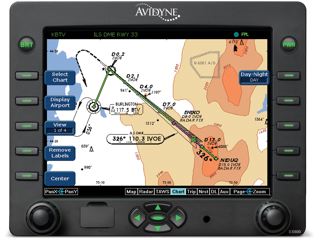
So, the EX600 gets us halfway to a "Paperless Cockpit"...and for a year we rarely pulled out an airport chart; we used the EX500/600 screen for almost all airport charts (Exceptions being the very complex arrivals/departures at major airports) and we still carried all Jepp binders and had them readily available. The HI/LO-Enroutes are still nearby and handy. For a while, we owned a nice Motion 1700 tablet and we ran Jepp's FlightDeck software on it. This gave us a fully independent and/or battery power source with an identical chart format. I found the device quite useful but a bit heavy and awkward to use. It was really designed to provide geo-referenced charts and to offer complex flight-planning and navigation tools (good ones, too) but all I really wanted was a device that would replace about a dozen Jepp 2" binders.

Then my pal Ken Dono at Columbia Aircraft called to tell me that the SolidFX tablet had been announced. He had been testing it for his neighbors who developed it and he said "This is IT!" He was so right. I tried and bought the tablet...which is a really sweet KISS ("Keep it Simple, Stupid") device. On the image to the left, a Nassau approach, we have written the ATIS info right on the chart...just like a pencil would, but erasing it later is much easier.

(All FXView images are of Release 1.2.9 which was made public on Feb 25, 2010)

Shown below, the FXView chart reader is zoomed into a detail of the same chart. We got to this view simply by circling the area shown and it zoomed in less than a second. One stylus tap backs us out to view a full size chart again. Again: one second. Slick.

I like things that work this way; I like to run a quiet cockpit with no clutter, no temporary cables, and no complex clunky "cobbled-up systems." The battery life is great; I have turned on the FX10 in the morning and used it all day without recharging. Battery life depends a bit on how many screen changes we make, of course. The chart subscription rates are a bargain, especially so if an aviator already uses NavSuite or JeppView MFD.

Now, having used the SolidFX tablet for six months or so, I find that the display roles are reversed: the FX10 tablet has become my primary chart display. It's light and so easy to use, easy to organize, so very reliable ... and so it's the first thing I reach for when Approach Control gives us a runway change.

That's exactly like I used my paper charts. Now, the Avidyne EX 600 backs up the tablet.


Possibly my favorite part of the Cmax functionality is the automatic display of the taxi charts. At initial PowerUp and initial taxi or after landing and slowing below 30 knots, this page appears, with the aircraft's ownship symbol.

Even on very complex ramps, it's kind of hard to get lost with tools like this.

SHORTCUTS & WORKSAVERS: On the SolidFX tablet, we can set up an abbreviated subset of frequently-used Favorite Airports and a Chart Clipboard with only the charts we might need for a flight. It's easy to drag and drop these trip-specific charts into the order that we'll need (EX: the departure Airport, then a SID, maybe a departure quick-return Approach, followed by the Destination's Arrival, Approaches, and Airport, etc.). We can turn pages (NEXT/PREV) through either list just as we would with paper. Very, very nice. This functionality surely parallels what most of us already do with paper charts, and ...

... just like a paper chart, we can use the stylus to write anything on a chart page...perhaps the Taxi routes, Hold Short points, and the ATIS...or even a telephone number (but it's very easy to erase all these notes after a flight; much easier than erasing notes from paper).

There are also full-page Notepads. The device comes with a ATC Clearance page, and I have added others: my VOR accuracy check log, and the GPS/EX600 NavData and ChartData update logs.

Independent of the FXView (charts) application, a Library will hold indexed PDF files and the Table-Of Contents to Page Number indexing works pretty well. So, I keep all my aircraft maintenance manuals on the tablet, too. One is 8,000+ pages and that's about 50 pounds of paper I don't carry anymore. The Library functionality isn't very fast, but we do have the data available everywhere we travel, which is a nice bonus.

If you have any interest at all, it's really worth your time to look at this nice SolidFX video demonstration and Part Two of the same demo.


GEO-REFERENCED Charts? Frequently, I am asked: "Will SolidFX ever have GPS geo-referenced charts?" No. The company says clearly that it has no plans for that capability...but so what? Neither do our paper charts. I don't even want all that extra complexity. The FX10 is a reader, it's simple, and it is very easy to use. I have loaned mine (powered up) to a dozen skilled pilots and none had any trouble figuring out how to use it. Not one of them had read the operator's manual, either.

One Westwind crew called SolidFX as I watched and they bought two of the tablets on the spot. (Disclaimer: I have never met any of the SolidFX team and I don't get paid in any manner. This device sells itself.)

Any questions? just give me a call, or click on the e-mail link below.

While you are here, have a look at our horse teams, and carriages, or take a tour of our farm in central Virginia.

Any questions?
Email the aircraft owner